Are you also a LinkedIn user and want to share a LinkedIn Profile Link from a PC or Mobile App on WhatsApp? Then this article is for you. You might be thinking about it as a very tough process, but you are wrong. It’s a very easy process that takes less than one minute.
LinkedIn is not a platform where you can share things like photography, dating, online chatting, news, debate, etc. But it’s a platform for business-oriented people. If you are looking for a job, then I feel LinkedIn is a good platform for you. But if you are on LinkedIn only to gain more likes and comments, then I feel you are wasting your time, nothing else.
90% of LinkedIn users who use LinkedIn on a regular basis are either CEO, MDs, owners, or freshers who are looking for a job. It’s a platform which will either teach you something or give you a chance to teach others. Most of the educated people are someone who loves to write, and if a platform is there which will help people to grow their online presense apart from blogging, then it’s X and LinkedIn.
Many SEO experts say the organic reach of various Social Media Platforms like Instagram, Facebook and Twitter (now X) is dead, but only LinkedIn is capable of getting organic reach if the content is powerful. And the best part, someone can build a strong community with just text-based content. If you are comfortable with photos and videos, then it’s really good, but if not, then LinkedIn is there to help you become a creator with just text-based content.
Also Read: Podcast Video Editing in Premiere Pro
About: LinkedIn
A lot of people think LinkedIn is a platform for Jobseekers and Reqruiters. But this is a myth. Now LinkedIn is one of the largest social media platforms in India and all over the world for B2B.
A lot of social media experts say that it’s good to post content between office hours on LinkedIn. Because most of the active users on LinkedIn are office employees, CEO, MDs, kind of people. I came to know in a YouTube Video, that if we post content on Thursday on LinkedIn, then we will get more reach than on other days.
We can post Images, Videos, Articles, Poll on LinkedIn. If you want to grow your career on LinkedIn or want more reach then I would like to recommend you to post Videos and Stories on a regular basis.
How To Share LinkedIn Profile from PC
- First of all, open LinkedIn Official Website.
- Log in with your LinkedIn username and password.
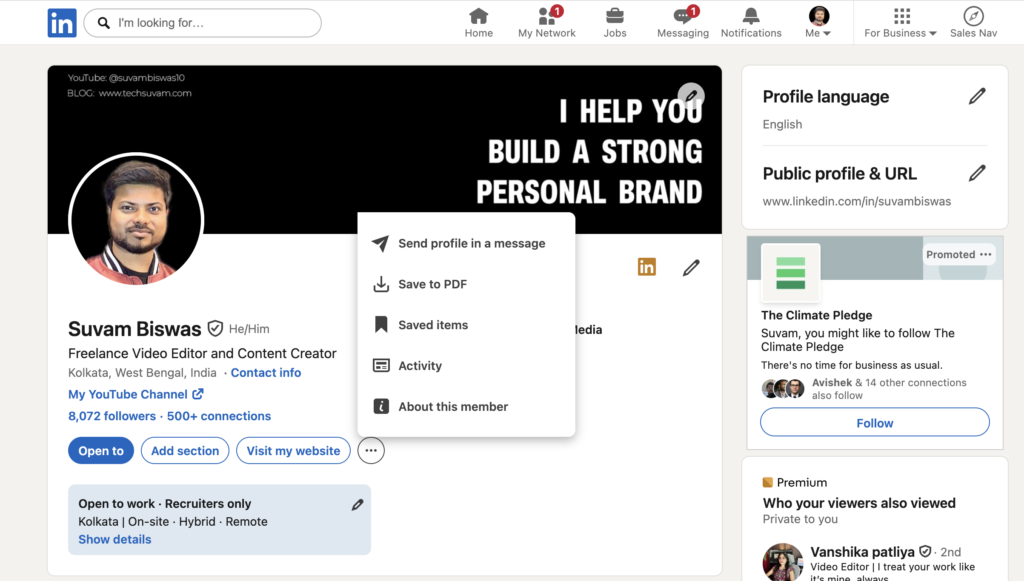
- Now, on the menu bar (above section), tap on the ‘Me’ section.
- Click on ‘View Profile’.
- Here you will get to see a lot of options. Tap on the three lines.
- Finally, press the ‘Share Profile in a message’.
- That’s it! Your LinkedIn Profile Link has been sent.
How To Share LinkedIn Profile from Mobile App
- To share your LinkedIn Profile from the mobile app, you need the app on your phone. So first of all, download and install the LinkedIn Mobile App on your Android or iPhone.
- Now go to the profile section.
- If you want to share your own profile link from the mobile app, then you have to type your username manually. But you can easily share another user’s profile link from the mobile app.
- Simply open any user profile >> Tap on the three lines.
- If you want to share your profile with any other LinkedIn user via message, then tap on ‘Share Profile in a message’.
- If you want to share your profile via WhatsApp, then tap on the ‘Share Profile Via…’ option.
Share your own Profile from Mobile App
If you want to share your own profile link from the mobile app, then first of all check your username and copy it.
- Open the LinkedIn Mobile App on your Smartphone.
- Tap on your profile picture and open it.
- Click on the three lines and then share the link.
- Tap on the ‘Send profile in a message’ option.
- You can also choose the ‘Share via’ option to share the link on other platforms.
How To Change Profile Link
If you are on LinkedIn to expand your business or to get a job, then it’s very important to keep an easy and short username. A lot of users, including me, prefer to create the same username on all social media platforms. So that our followers can remember it easily. For example, my username on LinkedIn and other platforms like Facebook, Instagram and Twitter is my name.
How To Change LinkedIn Profile Link
- First of all, open the LinkedIn Official Website.
- Click on the ‘Me’ icon.
- Now tap on the ‘View Profile’ option.
- Simply tap on the ‘Edit Profile & URL’ icon.
- Tap on the Pencil icon and edit your LinkedIn Profile URL.
- After this, save it. Done! Your LinkedIn Profile Link has been customised.
Bonus Tip: How To Grow On LinkedIn
Hello readers, I have not updated this article for more than 4 years. When I checked analytics, I found out that many people are still reading this, which indicates that the demand for it is still there. So I immediately updated it and added this bonus tip so that you can grow on LinkedIn.
No matter which platform you’re working on, believe me, if you’re consistent and working hard, then the platforms will give you the result that you deserve. One tip: don’t choose any shortcuts.
If you’re going to try Instagram, you’ve to create trending, entertaining, value-added content. Remember, your content must resonate with Gen Z.
If you’re using Facebook, then you’ve to create content that relate with old age people. Because most of the active Facebook users are not 18-24; they are 30-80+.
Whereas LinkedIn and X demand value-added, text-heavy content. If you’re someone who can write trending topics in short lines, go for X. If you want to start or grow your business, stick to LinkedIn.
Did I forget anything? Oh yes, YouTube. The OG.
On YouTube, long-form content is still the best way to build a long-term, trustworthy audience that will follow you and your lifestyle on each platform.
Here’s how you can grow on any platform-
- If one type of content is getting numbers, double down on it.
- Must add a CTA in your content.
- Make content that people are going to save and share.
- Commenting is the best way to grow. So comment on others’ content and make content with a strong CTA that your audience is going to comment on.
- Make a FREE product, and give it to your audience in return for a follow and a comment.
- Don’t spam, but you know collaboration and trending topics are the way to grow.
- Last but not least, learn STORTELLING.

Can reply be to gmail, also, please ?
Thanks with Regards